
Clean meta tags and structured data help search engines and AI answer engines understand exactly who you are, what you sell and which page answers which question. This kit gives you the head tags and JSON-LD each B2B page type should ship, ready to paste.
Meta-information for Enhanced Search Visibility
Meta-information, including meta titles and meta descriptions, plays a vital role in how your website appears in search results. Craft compelling and relevant meta titles (title tags) that accurately represent the content of each webpage. Keep them concise, around 50 to 60 characters, and include target keywords to improve click-through rates.
Example of Meta Title:
<!DOCTYPE html>
<html>
  <head>
    <title>Optimize Your Website Performance and SEO | Best Practices</title>
  </head>
  <body>
    <!-- Page content here -->
  </body>
</html>
Craft engaging meta descriptions that provide a concise summary of the page’s content, encouraging users to click through to your site. Aim for 150 to 160 characters and use relevant keywords naturally. Preview how each meta title and description will appear in Google with our free SERP preview tool before deploying, and check how the same page renders on LinkedIn, Facebook, and Slack with our free link preview tool.
Example of Meta Description:
<!DOCTYPE html>
<html>
  <head>
    <title>Optimize Your Website Performance and SEO | Best Practices</title>
    <meta
      name="description"
      content="Learn how to enhance your website's performance and SEO with smart strategies. Boost user experience and search rankings."
    />
  </head>
  <body>
    <!-- Page content here -->
  </body>
</html>
Metaviewport Tags for Mobile-friendly Websites
With the increasing use of mobile devices, a mobile-friendly website is crucial for SEO success. Implement the metaviewport tag to ensure your webpages scale correctly on different screen sizes, providing a seamless experience for mobile users.
Example of Metaviewport Tag:
<!DOCTYPE html>
<html>
  <head>
    <meta name="viewport" content="width=device-width, initial-scale=1.0" />
    <title>Optimize Your Website Performance and SEO | Best Practices</title>
  </head>
  <body>
    <!-- Page content here -->
  </body>
</html>
The metaviewport tag ensures that your website adapts to various devices, aligning with Google’s mobile-first indexing and positively impacting your SEO rankings.
Schema.org Markup for Rich Snippets
Implementing Schema.org markup allows you to provide structured data to search engines, enabling them to display rich snippets in search results. Rich snippets enhance your website’s visibility and attract more clicks by displaying additional information, such as star ratings, reviews, and event details. To create the JSON-LD without writing it by hand, use our free JSON-LD schema markup generator.
Example of FAQ Schema Markup:
<!DOCTYPE html>
<html>
  <head>
    <title>Optimize Your Website Performance and SEO | Best Practices</title>
    <script type="application/ld+json">
      {
        "@context": "https://schema.org",
        "@type": "FAQPage",
        "mainEntity": [
          {
            "@type": "Question",
            "name": "Why is website performance important for SEO?",
            "acceptedAnswer": {
              "@type": "Answer",
              "text": "Website performance impacts user experience and search engine rankings. Faster websites are favored by search engines and lead to higher user satisfaction."
            }
          },
          {
            "@type": "Question",
            "name": "How can I optimize my website's loading speed?",
            "acceptedAnswer": {
              "@type": "Answer",
              "text": "Optimize images, enable browser caching, and minify CSS and JavaScript files to improve your website's loading speed."
            }
          },
          {
            "@type": "Question",
            "name": "What is the importance of mobile optimization?",
            "acceptedAnswer": {
              "@type": "Answer",
              "text": "Mobile-friendly websites are prioritized by search engines and provide better user experiences, positively impacting SEO rankings."
            }
          }
        ]
      }
    </script>
  </head>
  <body>
    <!-- Page content here -->
  </body>
</html>
By using Schema.org markup, such as the FAQPage schema, you make your content more structured and informative, which search engines appreciate, ultimately leading to higher visibility in search results.
Schema is now also being tested as a signal for AI answers. This breakdown of schema markup and AI citations looks at whether it helps pages get cited by ChatGPT, Perplexity and Google AI Mode.
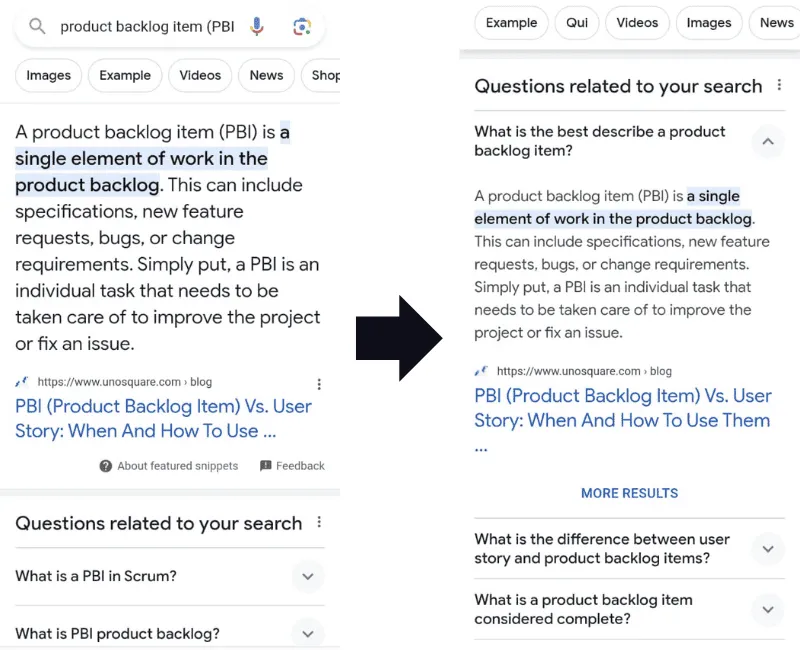
Implementing meta-information, metaviewport tags, and Schema.org markup are essential components of your website’s performance and SEO strategy. Optimized meta titles and descriptions improve search visibility and attract more clicks, while metaviewport tags ensure a seamless experience for mobile users.
Leveraging Schema.org markup, such as the FAQ schema, enhances search engine understanding of your content, leading to rich snippets and higher click-through rates. By integrating these practices into your website, you’ll not only elevate your search engine rankings but also create a more user-friendly and engaging experience for your visitors.
Stay committed to these best practices, and your website will thrive in the competitive digital landscape, delivering valuable content to your audience and impressing search engines alike.
The Page Type Matrix
| Page type | Title and description | Open Graph | Schema types |
|---|---|---|---|
| Homepage | Brand + core outcome | Yes | Organization, WebSite |
| Service page | Service + audience | Yes | Service, BreadcrumbList, FAQPage if FAQs exist |
| Industry page | Industry + outcome | Yes | Service or WebPage, BreadcrumbList |
| Blog post | Query-matched headline | Yes | Article or BlogPosting, BreadcrumbList |
| Case study | Client type + result | Yes | Article, BreadcrumbList |
| Free tool | Tool name + “Free” | Yes | WebApplication or SoftwareApplication, FAQPage |
| SaaS product page | Product + job to be done | Yes | SoftwareApplication |
Meta Tags for SEO: What Every Page Needs
<title>Primary Query | Brand</title>
<meta
  name="description"
  content="One or two sentences, about 150 characters, that promise the outcome."
/>
<link rel="canonical" href="https://www.example.com/page" />
<meta name="viewport" content="width=device-width, initial-scale=1" />
<meta property="og:title" content="Primary Query | Brand" />
<meta
  property="og:description"
  content="Same promise, written for a social feed."
/>
<meta property="og:image" content="https://www.example.com/og/page.png" />
<meta property="og:url" content="https://www.example.com/page" />
<meta name="twitter:card" content="summary_large_image" />
Build and preview these with the free Open Graph tag generator. For mobile viewport details, see mobile SEO for developers.
Schema Markup Examples: Organization (Homepage)
{
  "@context": "https://schema.org",
  "@type": "Organization",
  "name": "Example Co",
  "url": "https://www.example.com",
  "logo": "https://www.example.com/logo.png",
  "alternateName": ["Example", "ExampleCo"],
  "sameAs": ["https://www.linkedin.com/company/example"]
}
Tip: add common misspellings of your brand to alternateName so search engines connect them to you.
Service Schema (Service Pages)
{
  "@context": "https://schema.org",
  "@type": "Service",
  "name": "B2B SEO Services",
  "provider": { "@type": "Organization", "name": "Example Co" },
  "areaServed": "US",
  "serviceType": "Search engine optimization"
}
FAQPage Schema
Only mark up questions that are visible on the page. Generate valid JSON-LD for FAQ, Organization, Product and more with the free JSON-LD schema generator.
Validate Before You Ship
- Run the page through Google’s Rich Results Test.
- Check Search Console Enhancements reports after deploy.
- Preview your social card with the social link preview tool.